A toolbox talk form sits crumpled at the bottom of a hard hat, stained with coffee and half-filled out. The foreman signs it without reading. The crew nods along, already thinking about lunch. If this sounds familiar, the form isn’t the problem—its design and execution are.
Toolbox talk forms aren’t just paperwork. When done right, they’re frontline defense mechanisms against accidents, miscommunication, and regulatory risk. But too many teams treat them as compliance checkboxes, not communication tools. The gap between a useless form and a powerful one comes down to structure, clarity, and real-world relevance.
Let’s break down how to turn your toolbox talk form from forgotten to fundamental.
What a Toolbox Talk Form Actually Does
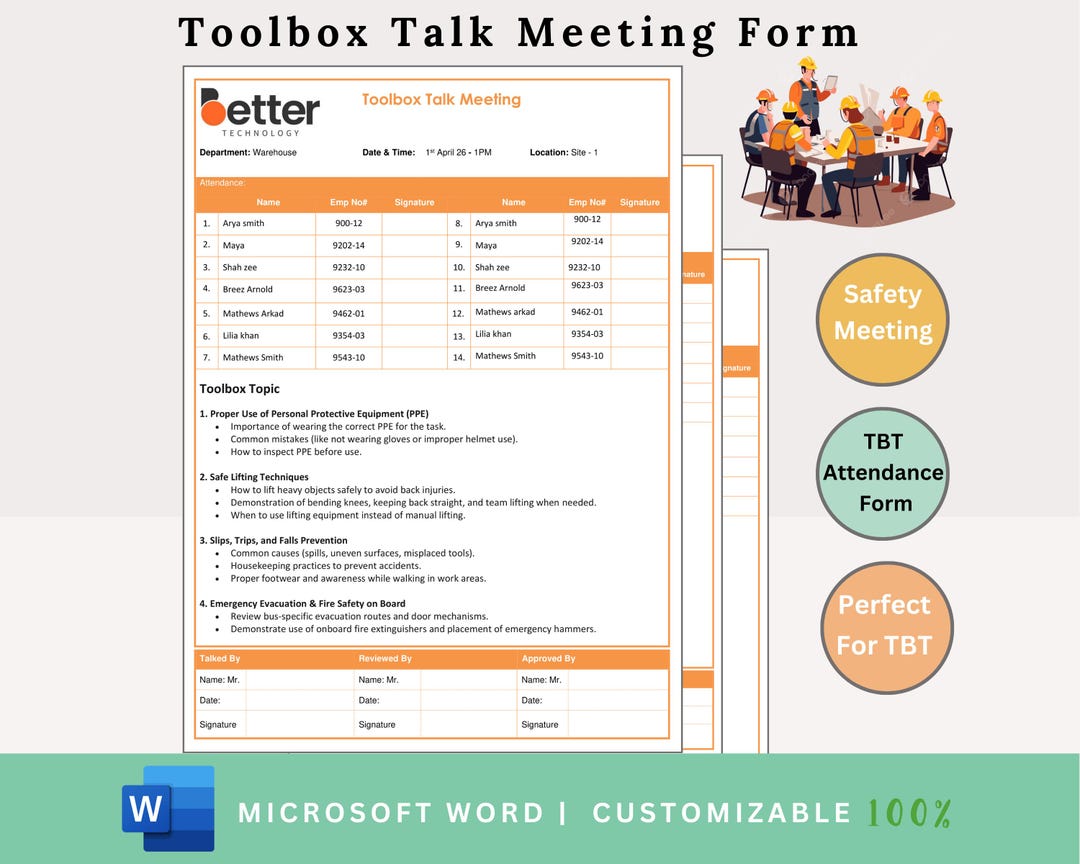
A toolbox talk form is a structured document used to record short safety meetings held before or during a work shift. These talks focus on specific hazards, procedures, or behaviors relevant to the day’s tasks. The form captures key details: topic, attendees, discussion points, hazards identified, and controls put in place.
Its real purpose? - Reinforce safety protocols - Identify emerging risks - Confirm understanding across the team - Create a legal record of due diligence
Without a well-designed form, these goals collapse. A blank space titled “Discussion Notes” invites vagueness. A missing signature line undermines accountability. A generic template used across different job types ignores context.
Core Elements of a High-Performing Toolbox Talk Form
Forget one-size-fits-all templates. An effective form aligns with your team’s actual workflow. Include these non-negotiable sections:
1. Meeting Header Basic but critical. Must include:
- Date and time
- Location or work area
- Supervisor or facilitator name
- Weather conditions (if outdoors)
Example: A roofing crew discussing fall protection on a windy morning needs that weather note. It justifies extra tie-offs and supports incident reports if conditions change.
2. Topic & Objective Be specific. “Ladder Safety” is weak. “Safe Setup and Use of Extension Ladders on Uneven Ground” is actionable.
Include a one-sentence goal: “Ensure all team members can identify three correct setup practices for extension ladders on slopes.”
3. Attendee List with Sign-Off Names only aren’t enough. Add roles (e.g., Operator, Apprentice, Spotter). Require signatures or initials. Digital forms can use timestamped check-ins.
Common mistake: Leaving this blank “to save time.” That invalidates the entire record during an OSHA audit.
4. Hazard Identification Section Use a simple table or bullet format:
- Hazard (e.g., Unguarded trench edge)
- Risk Level (Low/Medium/High)
- Control Measures (e.g., Install barrier tape and assign monitor)
This turns abstract talk into concrete action.
5. Discussion Summary Not a transcript. A concise, searchable recap of key points covered. Two to four bullet points max.

Bad: “Talked about safety.” Good: “Reviewed lockout/tagout steps for conveyor maintenance. Emphasized verifying zero energy before servicing.”
6. Follow-Up Actions Who does what, by when. Assign tasks:
- “J. Rivera to inspect harnesses by Thursday”
- “Post new signage at scaffold entrance”
Without this, accountability evaporates.
Common Pitfalls and How to Avoid Them
Even good forms fail in practice. Here’s where things go wrong—and how to fix them.
Mistake 1: Using the Same Form for Every Job An office HVAC tech has different risks than a highway paving crew. Customize your form for the task.
Fix: Create versions for high-risk categories: - Confined space entry - Hot work - Equipment operation - Electrical safety
Mistake 2: Overloading with Fields Too many sections turn the form into a chore. Crews rush or skip it.
Fix: Use dynamic forms. Show only relevant fields based on selected topic. Example: If “Fall Protection” is chosen, auto-display harness inspection and anchor point checks.
Mistake 3: No Follow-Through on Actions Discussed a hazard but never fixed it? That kills credibility.
Fix: Build a weekly review habit. Supervisors scan completed forms, track open items, and report progress at safety meetings.
Mistake 4: Ignoring Worker Input Top-down talks feel like lectures. Workers disengage.
Fix: Add a field: “Team Suggestions.” Encourage crew members to contribute hazards or solutions. Rotate who leads the talk monthly.
5 Toolbox Talk Form Templates You Can Use Today
While custom is best, starting with a solid template speeds adoption. Here are five proven options:
| Name | Best For | Format | Key Feature |
|---|---|---|---|
| OSHA Quick Card Template | Compliance-first teams | PDF, printable | Aligns with OSHA standards, minimal fields |
| SafetyCulture (iAuditor) Form | Digital workflows | Mobile app | Photo uploads, real-time sync, analytics |
| Procore Safety Talks | Construction management | Integrated platform | Links to project schedule and personnel records |
| ClickSafety Toolbox Talk Generator | Training-heavy sites | Web-based | Auto-generates talking points by topic |
| DIY Excel Template | Budget-conscious teams | Spreadsheet | Customizable, supports dropdowns and data validation |
Choose based on your tech level and workflow. A paper-based crew won’t benefit from a complex app. A multi-site contractor needs cloud access and reporting.
When to Go Digital vs. Paper
The format impacts usage, accuracy, and audit readiness.
Paper Forms: Pros and Cons Pros:
- No tech required
- Works offline
- Easy to modify in the field
Cons: - Lost or damaged easily - Hard to search or archive - Delayed reporting
Use when: Crews are remote, tech access is limited, or you’re transitioning to digital.
Digital Forms: Pros and Cons Pros:
- Auto-save and cloud backup
- Instant alerts for high-risk issues
- Analytics on recurring hazards
- Integrates with safety management systems
Cons: - Requires devices and training - Connectivity issues in remote zones - Upfront setup time
Use when: You manage multiple sites, face frequent audits, or want proactive risk tracking.
Hybrid approach? Scan and upload paper forms daily. But aim for digital—it reduces human error and speeds response times.
Real-World Example: Form in Action
Scenario: A pipeline construction team prepares for trenching work.
Toolbox Talk Form Highlights: - Topic: Trench Safety – 8-Foot Excavation - Hazards Identified: Soil collapse, nearby crane operation, water seepage - Controls: Sloping walls, benching, trench box deployment, spotter assigned - Attendees: 6 crew members, all signed - Action Item: Safety officer to inspect trench box before 9:00 AM
Two days later, a light rain causes soil shift. Because the hazard was documented and controls were reviewed, the crew evacuates immediately. No injury. The form becomes evidence of due diligence in the incident report.
Design Tips for Maximum Engagement
A form should support the conversation, not stifle it.
- Use plain language. Avoid jargon. “Inspect PPE” → “Check gloves, harness, and helmet for damage.”
- Add visuals. A small diagram of proper ladder angles boosts understanding.
- Keep it to one page. If it spills over, simplify.
- Color-code risk levels. Red for high, yellow for medium—visual cues work.
- Include a “Did You Know?” tip. Example: “90% of trench fatalities happen in digs less than 15 feet deep.”
Small design choices drive attention.
Make It a Habit, Not a Hassle
The best form fails without routine.
- Hold talks at the same time daily—e.g., right after roll call.
- Rotate facilitators to build ownership.
- Review past forms weekly: What hazards keep coming up?
- Reward teams that complete 30 days without unsafe acts noted.
Consistency turns compliance into culture.
A toolbox talk form is only as strong as the process behind it. It’s not about filling boxes. It’s about creating a shared language of safety—one conversation at a time.
Design it with purpose. Use it with discipline. Review it with intent. That’s how you turn a simple form into a shield against risk.
FAQ
What should be included in a toolbox talk form? Essential sections: date, location, topic, attendees, hazards, controls, discussion summary, and follow-up actions with responsible parties.
How often should toolbox talks be conducted? Daily or before starting high-risk tasks. Weekly at minimum for low-risk environments.
Who is responsible for leading a toolbox talk? Typically a supervisor, foreman, or designated safety officer—but team members should rotate in.
Can toolbox talk forms be digital? Yes, and they often improve compliance. Apps like SafetyCulture or Procore offer mobile, cloud-based forms with tracking.
Are toolbox talk forms legally required? Not always, but they serve as critical evidence of safety efforts during OSHA inspections or incident investigations.
Should workers sign the form? Yes. Signatures or initials confirm attendance and understanding, strengthening legal and compliance standing.
How long should a toolbox talk last? 5 to 15 minutes. Focus on one specific topic to maintain engagement and clarity.
FAQ
What should you look for in How to Create an Effective Toolbox Talk Form? Focus on relevance, practical value, and how well the solution matches real user intent.
Is How to Create an Effective Toolbox Talk Form suitable for beginners? That depends on the workflow, but a clear step-by-step approach usually makes it easier to start.
How do you compare options around How to Create an Effective Toolbox Talk Form? Compare features, trust signals, limitations, pricing, and ease of implementation.
What mistakes should you avoid? Avoid generic choices, weak validation, and decisions based only on marketing claims.
What is the next best step? Shortlist the most relevant options, validate them quickly, and refine from real-world results.